Intervals
Interval sessions you build, and never have to count.
Reps are the session runners most often end up doing badly, because the app they are using turns every boundary into a decision. TrakRun takes the counting off you: build the session once, then run it while it tells you where you are.
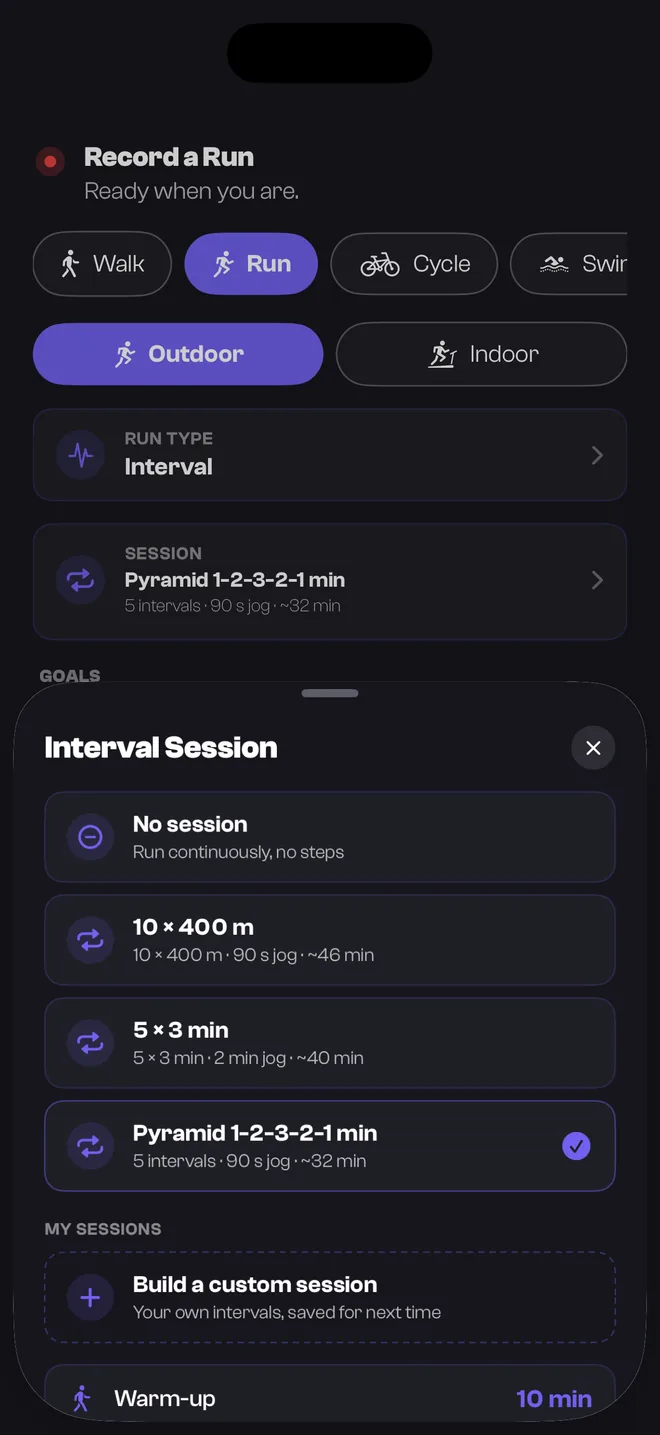
Not another HIIT timer
Search for an interval app and most of what comes back is a stopwatch: set a work time, set a rest time, tap start. Fine for a gym circuit, where “hard” doesn’t need a pace attached to it. Wrong tool for a track session, where the entire point is hitting a specific pace for a specific distance, then recovering just long enough to do it again. TrakRun is built for the second kind.
Build the session, once
Sessions are yours to write rather than yours to choose from a menu. A session is a warm-up, a block of repeats and a cool-down, and each of those is set the way you would say it out loud:
- Repeats by distance or by time — 6 × 800 m, or 8 × 3 minutes, whichever the session is actually written in.
- The recovery between them, set explicitly rather than assumed.
- A warm-up and a cool-down, so the session is the whole run rather than the fast bit with two untracked jogs either side.
Save it and it is there next week. The Tuesday session you keep doing should take one tap to start, not five minutes of rebuilding.
Being coached through it
Once the session is running, the app’s job is to keep your eyes up. It shows the step you are in and what is left of it, and it marks every boundary with a haptic and a spoken cue — the end of a rep, the start of the recovery, the approach to the finish.
That is the whole point of a structured session on a wearable: you should never be doing arithmetic at 3:40/km. Nothing to count, nothing to press between reps, no glancing down to work out whether that beep was the rep or the split. As each rep completes you get to see how it went, so a session that is falling apart is visible while you can still do something about it.
If the run has a target pace, there is a live indication of whether you are fast, on pace or slow right now — and TrakRun says it out loud, only when it has changed. A cue that has gone stale is dropped rather than played late, because a pace correction for a reading you left a minute ago is worse than silence.
On the wrist, with the phone at home
Interval sessions are the reason most runners end up carrying a phone, so they are built into the watchOS app rather than mirrored from it. Set one up on the wrist, run it, and it syncs back when the two devices are next in range — with the same splits and the same analysis a phone-recorded run would get.
Pair a Bluetooth chest strap and TrakRun reads that instead of the wrist, which is worth doing for reps specifically: wrist optical heart rate is at its least reliable exactly when the effort changes fastest.
Picking the pace to run them at
A rep at the wrong intensity is a rep spent on the wrong adaptation, and “hard” is not a pace. TrakRun derives six pace zones from your own predicted 5K rather than a generic table, so the target you set for a threshold session is anchored on your current running rather than on where you were in the spring.
Afterwards, the session lands in your training load as the hard day it was. Which matters more than it sounds: the common way to get injured is not one bad session, it is a week of hard days with nothing easy between them, and that is a pattern TrakRun watches for and tells you about.
All of it is free
Building sessions, running them and being coached through them are in the free tier, on the phone and the watch alike — as is the rest of the run tracking. Structured work is not the kind of thing that should sit behind a subscription; it is how most people train.
TrakRun Pro is the layer that reads the training in depth — coaching, run analysis and load — which is a different question from whether the app can count your reps for you.
Common questions
- Can I build my own interval sessions?
- Yes — that is how it works. Set a warm-up, a block of repeats by distance or by time with the recovery between them, and a cool-down, then save it and reuse it. There is no fixed library you have to pick from.
- Do interval sessions work on the Apple Watch without my phone?
- Yes. Sessions are built into the watchOS app rather than mirrored from the phone, so you can set one up on the wrist and run it with the phone at home. The watch shows the step you are in and what is left of it, and buzzes and speaks at every boundary.
- Does TrakRun tell me when to start and stop each rep?
- Yes. Every boundary gets a haptic and a spoken cue — the end of a rep, the start of the recovery, the approach to the finish — so you never have to look down mid-rep or count anything yourself. Cues duck your music rather than stopping it.
- Are interval sessions a paid feature?
- No. Building and running interval sessions is in the free tier, on both the iPhone and the Apple Watch, along with the spoken cues that coach you through them. TrakRun Pro is the analysis built on top of your training, not the recording of it.
- What happens if the app is interrupted mid-session?
- The run is not lost. TrakRun checkpoints an in-progress workout and offers to pick it back up where it stopped, rather than making you start the session again or throw it away.