Apple Watch
Everything the run needs, on your Apple Watch.
Leave the phone at home. TrakRun's Apple Watch app records the whole run from your wrist — route, pace, heart rate, splits — coaches a structured session step by step, and syncs it back to your iPhone the moment you finish.
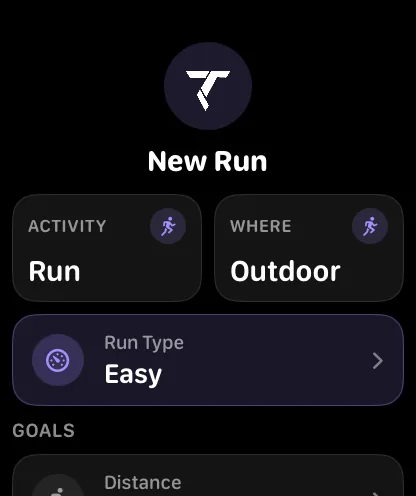
A standalone run, not a remote control
Plenty of watch apps are a button that starts something on your phone. This one records the run itself: it takes its own GPS fix, builds its own route, reads heart rate continuously from the wrist, and saves the workout to Apple Health from the watch.
Which means the phone is genuinely optional. Start from the wrist, run, and the session lands on your iPhone when the two are next in range — with the same splits and the same analysis a phone-recorded run would get.
What you see mid-run
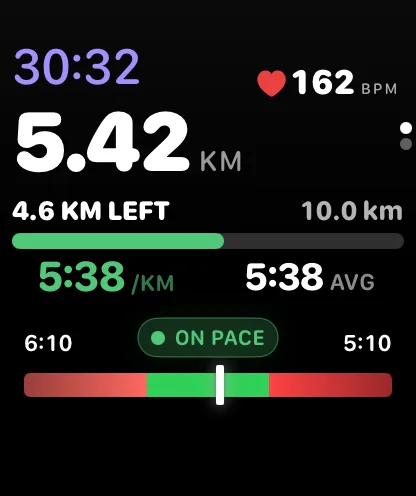
A watch face during a run has room for about four numbers before it stops being readable at a glance, so the live screen carries the ones you act on: elapsed time, distance, current pace and heart rate, with the rest a swipe away.
If the run has a target pace, there is a band showing whether you are fast, on pace or slow right now — the thing you actually want at the moment you glance down, rather than a number you have to do arithmetic on. Set a target distance or duration and it fills a progress strip as you go.
Spoken cues, so you can stop looking
The most useful thing a watch can do mid-run is let you keep your eyes up. TrakRun speaks the moments that matter and stays quiet otherwise:
- Each split, as you cross it — with a heads-up just before, so the cue lands on the mark rather than after it.
- Pace coaching — speed up, slow down or on pace, against the target you set, and only when it has changed.
- Session boundaries — the end of a rep, the start of the recovery, the approach to the finish.
Cues duck your music rather than stopping it, they go to whichever headphones you are wearing, and a cue that has gone stale is dropped rather than played late — a pace correction for a reading you left a minute ago is worse than silence. If you would rather run without any of it, it is one switch.
Structured sessions on the Apple Watch
Interval sessions are the reason most runners end up carrying a phone, so they are built into the watch app rather than mirrored from it. Set a warm-up, the block of repeats — by distance or by time, with the recovery between them — and a cool-down, then run it.
The watch shows the step you are in and what is left of it, buzzes and speaks at each boundary, and shows you how the rep went as it completes. Nothing to look up, nothing to count, nothing to press between reps.
The same sessions suit run and walk plans: see Couch to 5K on Apple Watch. If you are deciding which apps to run alongside it, there is a comparison of the main options.
Indoors, and when things go wrong
Treadmill runs are a separate mode rather than an outdoor run with a broken GPS trace: location tracking is skipped entirely, distance comes from motion, and the run isn’t annotated with a map and elevation it never had.
And if the app is interrupted mid-session, the run is checkpointed — you are offered it back where it stopped instead of losing it.
What the watch feeds
Wearing the watch overnight is what makes the recovery side of TrakRun work. Heart rate variability and resting heart rate recorded while you sleep are most of what a readiness score is built from, and sleep staging is scored against your own average rather than a target everyone shares.
Runs recorded on the wrist in Apple’s own Workout app count too — they reach TrakRun through Apple Health like anything else, so there is no penalty for the days you forget to open TrakRun first.
Recording is free, on the watch and the phone alike, including the split cues and the interval sessions. So are your daily readiness score and pace zones. The deeper analysis — coaching, run analysis and training load — is TrakRun Pro.
Common questions
- Can I run with TrakRun without my iPhone?
- Yes. The watchOS app records the run on its own — GPS route, distance, pace and heart rate — and syncs it to your iPhone when you are back in range. The phone doesn't need to be with you or even switched on.
- Do I need an Apple Watch to use TrakRun?
- No. Your iPhone records GPS, distance, pace and route by itself, and the app is fully usable with the phone alone. An Apple Watch adds wrist recording and continuous heart rate, which is what the overnight recovery signals are built from.
- Can I do interval sessions from my watch?
- Yes. You can set up a session on the wrist — warm-up, the repeats, and the recovery between them — and the watch coaches you through it step by step, with a haptic and a spoken cue at each boundary so you never have to look down mid-rep.
- What happens if the watch app crashes mid-run?
- The run is not lost. TrakRun checkpoints an in-progress workout and offers to pick it back up where it stopped, rather than making you start again or throw the session away.
- Is Apple Watch as good as a dedicated running watch?
- For most training up to marathon distance, yes. GPS accuracy and heart rate are close enough for pacing and zones, and TrakRun adds pace zones, coaching and structured intervals on the wrist. Where a dedicated running watch still wins is battery life on very long efforts, so training for an ultra or a multi-day event is a real reason to look at Garmin or Coros instead.
- Which Apple Watch is best for running?
- Any recent Apple Watch records a run well, because GPS is built into every model — cellular is only needed to stream music or take calls without your phone. The choice is mostly battery and screen: the Ultra line has the longest battery life and the largest display, the Series watches are the all-rounder, and the SE is the cheapest way in and records the same runs. Whichever you buy, wear it overnight, because the recovery signals TrakRun reads are recorded while you sleep. Apple's range and prices change, so check its current lineup, and the TrakRun App Store listing for the watchOS version it needs.